Sephiria Controls and Controller Support
Sephiria's default keys and gamepad bindings, what TEAM HORAY has said about controller support, and which input problems are fixed versus still open.
Official sourcesCurrent for 1.0.33
GamePrimer EditorialUpdated Verified
Sephiria has full controller support and it has been rebuilt steadily since Early Access — TEAM HORAY said in 2025 that the state of it was “not satisfactory” and has shipped input fixes in most patches since. Most keys are rebindable, and rebindable actions get a secondary binding slot as well — though a few actions cannot be reassigned at all. If your gamepad moves but does nothing else, that is the single most reported problem and there is a known workaround below.
Why this page exists
Search for the gamepad problem most Sephiria players hit and the top result is a forum for an entirely different game. Not because nobody has written about Sephiria’s controls, but because nobody assembled what the developer has said about them — and it turns out to be two years of fixes plus one unusually frank admission, all of it public.
So this page leads with that record rather than with a key chart. The dates are the developer’s own, and each links to the announcement it came from.
What TEAM HORAY has actually said
- TEAM HORAY says so itself2025-05-12
the current controller support is not satisfactory, we plan to provide additional support in the future
- Right stick aiming2025-05-29
Controller: Fixed the right stick to function for aiming.
- Secondary key bindings added2025-07-01
secondary key binding feature that allows using the same functions as existing keys
- Middle-click Tablet rotation added2026-07-31
You can now rotate Tablets with a middle mouse click.
- Photosensitivity warning added2026-07-31
A photosensitive seizure warning is now shown when the game starts.
- On-screen gamepad skill UI2026-08-13
A gamepad skill UI is now displayed on screen.
| Action | Keyboard & mouse | Gamepad |
|---|---|---|
| MoveWASD is confirmed indirectly by a Korean bug report whose title is literally 'suddenly after ALT+TAB I can't move with WASD'. Movement is rebindable — another player writes 'I've set movement to arrow keys'. On gamepad, the left stick is the only input that survives the Mac controller failure ('only the left stick works'), which places movement there.ConfirmedCommunity 1Community 2Community 3 | W A S D | Left stick |
| Normal AttackFireBrother's Steam guide defines the stat 'Normal Attack Damage' as adjusting 'the damage of general attacks (left click)'. A bug report independently says 'frostbolt (left click)' alongside 'blessing (right click)'. The gamepad default comes from one player describing his remap: 'I did remap some keys (R1 instead of square for attacking)' — a single report, so treat the face-button default as indicative rather than settled.One report onlyCommunity 1Community 2Community 3 | Left mouse button | Face button (Square on PlayStation / X on Xbox) |
| Special AttackFireBrother's guide: 'Special Attack Damage ... Adjust the damage of special attacks (right mouse).' Corroborated by a bug report listing 'blessing(right click)' as an attack input. The gamepad default is not stated anywhere I could source; 1.0.30 does confirm the action exists on both — 'Holding down the attack button while a Special Attack is being cast now continues your attack immediately once the Special Attack ends.'ConfirmedCommunity 1Community 2 | Right mouse button | — |
| AimOn keyboard and mouse your attacks always fire toward the cursor, including dash attacks, and there is no toggle. TEAM HORAY confirmed the design choice directly: asked for cursor auto-tracking, MegurinE [developer] replied 'Thank you for the suggestion. We've removed this feature as it was a major inconvenience for users when using ranged weapons, but we'll look into adding it in the future if possible.' A later player asks again: 'is there a way to disable the attacks going towards the mouse cursor? ... it's kinda difficult with mouse aim being always active and also affecting dash attacks' — no reply. Gamepad aiming is the right stick, and gamepad-only auto-aim does exist (see the auto-aim row).ConfirmedOfficial reply 1Community 2Community 3 | Mouse cursor position — always on, cannot be disabled | Right stick (with an auto-aim option in settings) |
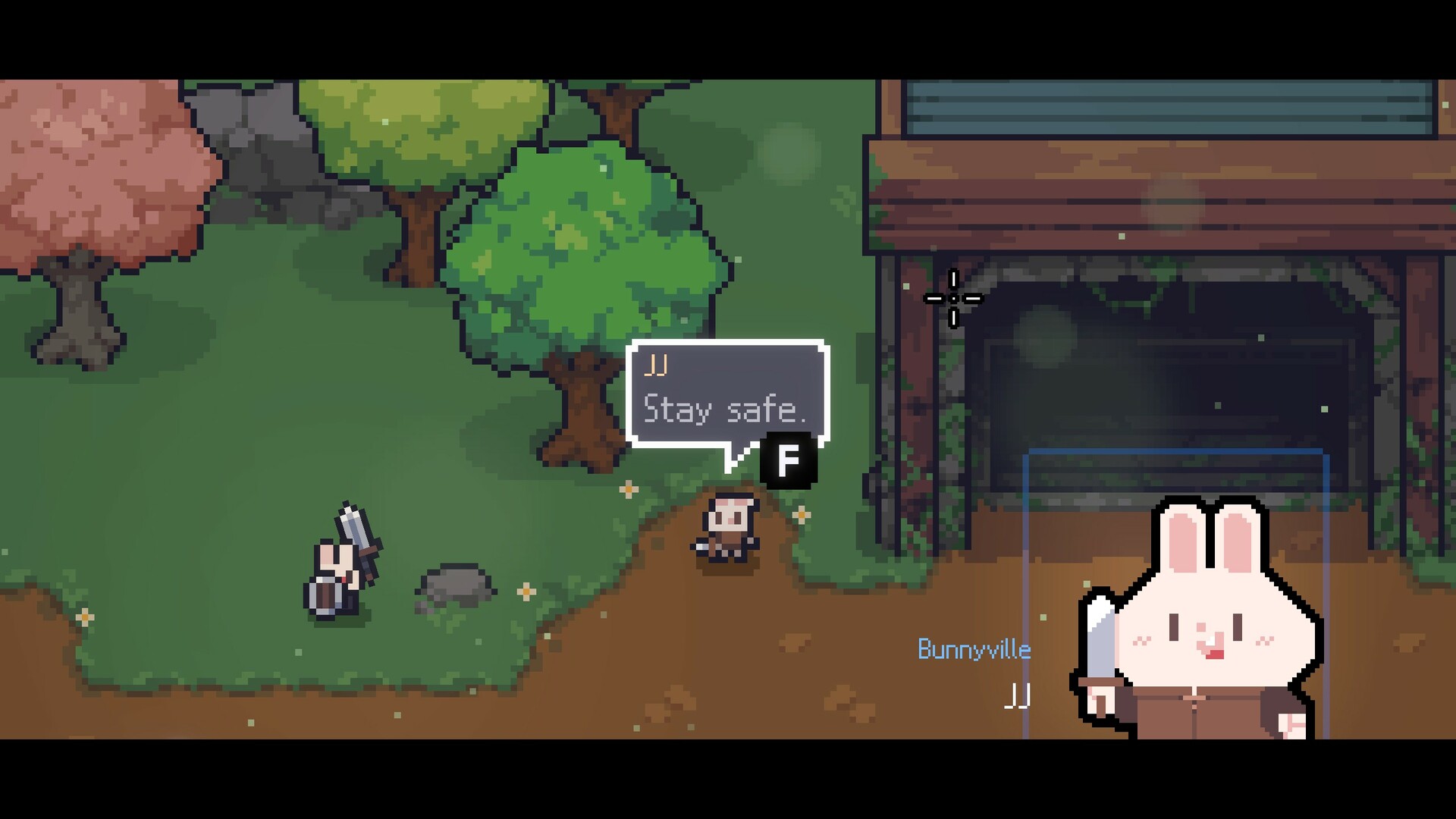
| Interact / talk / enterF is visible in TEAM HORAY's own Steam store screenshot: the NPC in Bunnyville says 'Stay safe.' with a black 'F' key cap under the speech bubble. Community bug reports use the two bindings interchangeably — an English report titled 'can't go into dungeon after updating to 1.0.25' says 'Neither "F" nor "RB" work on the dungeon alone', and a Russian report independently names RB at the same dungeon entrance. Multiple Chinese reports use the shorthand '按F' (press F) for entering.ConfirmedOfficial 1Community 2Community 3 | F | RB / R1 |
| Use potionRead off the HUD in three separate TEAM HORAY store screenshots: under the red HP bar and blue MP bar sits the potion slot with a black key cap reading 'R', with the stack count beside it. A gamepad potion action exists (a bug report says 'I can swap potions with keyboard, but not with the Gamepad') but its button is not sourced.ConfirmedOfficial 1Official 2Official 3 | R | — |
| Quick-cast a Grimoire (spell) from a slotTEAM HORAY's store screenshot 7 shows the spell bar across the bottom of the screen: four slots with black key caps reading 1, 2, 3 and 4, slot 1 holding a Grimoire and highlighted. On gamepad this is official and dated: 1.0.26 (13 Aug 2026) states 'The RT key has been changed to the default key for Quick Cast 1' and 'More quick cast keys can now be added in the Options - Gamepad menu', alongside 'A gamepad skill UI is now displayed on screen.' One community post claims the keyboard skill keys run 1-8 rather than 1-4 — recorded as a conflict.ConfirmedOfficial 1Official 2 | 1 2 3 4 (number keys) | RT is the default for Quick Cast 1 since 1.0.26; more quick-cast keys can be added in Options - Gamepad |
| What Shift does — magic casting modeThis is the answer to 'sephiria para que es el shift' and 'sephiria shift key'. Shift is not sprint and not dash — it opens the spell/Grimoire casting mode. The in-game magic tutorial says so: a player who had just unlocked the system writes 'it said to hold shift then select a spell and cast it or something like that'. Another explains the two ways to cast: spellbooks 'can be activated by pressing a hot key (keyboard is number keys) or holding shift to manually cycle through to activate with your mouse'. A third gives the practical form: 'Hold shift and spam left click can do it while moving around, scroll to the spell you want to spam.' TEAM HORAY corroborate that the mode exists and is their own term — 1.0.26: 'Fixed an issue where magic casting mode was not canceled while the Steam overlay was open.' The Shift key itself is community-sourced; the mode is official.ConfirmedCommunity 1Community 2Official 3 | Hold Shift to enter magic casting mode: cycle to the Grimoire you want, then click to cast it at the cursor | A hold-to-cast modifier exists (see the gamepad cast-modifier row) |
| Cycle the selected Grimoire while in casting mode'Hold shift and spam left click can do it while moving around, scroll to the spell you want to spam.' A separate player answering a question about potions says 'Default is mousewheel, I believe' — hedged, and about potions rather than spells. Both claims are logged in the conflicts list; do not merge them into one confident sentence.One report onlyCommunity 1Community 2 | Mouse wheel (while holding Shift) | — |
| Raise / lower Artifact preview level (also Root's Retreat and Hard Mode difficulty steps)FireBrother's guide: 'By clicking <Q> or <E> you can either decrease or increase the level of Artifact while in preview so you can see how the tablets would affect the Artifact.' A Steam Deck user hitting the gamepad bug names the same pair: 'Preview Level is currently not a bindable option for controller ... On keyboard this is curently set to q and e - but theres no controller option to bind a key at all for it'. Two independent community sources agreeing on Q/E.ConfirmedCommunity 1Community 2 | Q and E | Unassigned on 1.0.26 and not bindable (see the issue row) |
| Rotate a Tablet before placing itTHE 'R' CLAIM IS WRONG — do not repeat it. The 1.0 Update (31 Jul 2026) says, verbatim, under its UI heading: 'You can now rotate Tablets with a middle mouse click.' Separately, TEAM HORAY's live Steam store screenshot 9 shows the Tablet placement panel — 'Increase Artifact Level', 'Reduce Artifact Level', then a mouse glyph beside the word 'Rotate'. Enlarged at native 1920x1080 the highlighted red segment of that mouse glyph is the RIGHT button, not the scroll wheel. The most likely reading is that right-click always rotated and 1.0 added middle click as a second way, but TEAM HORAY have not said that, so both values are recorded and neither is presented as the sole truth. The gamepad equivalent is not documented anywhere I could reach.Sources conflictOfficial 1Official 2 | Middle mouse click (TEAM HORAY, 1.0) — the in-game Rotate prompt shows the RIGHT mouse button | — |
| Open the start menu / JournalFireBrother's guide: 'If you click Esc -> Journal.' The Japanese wikiwiki.jp FAQ gives both devices in one line: '拠点からビルドの構想を練りたいが図録のようなものはありますか — A. ESCやoptボタンからスタートメニューを開くとその項目があります' ('open the start menu with ESC or the opt button'). TEAM HORAY corroborate the gamepad side sideways in 0.12.3: 'Fixed a bug where the "start" button was included among the remappable keys when remapping gamepad inputs on Steam Deck' — i.e. it is a fixed system button.ConfirmedCommunity 1Community 2Official 3 | Esc | Options (PlayStation) / Menu (Xbox) — the 'start' button |
| Open the Talents screenFireBrother's guide: talent upgrades are 'reversible so you can change it at any time, outside of dungeon by using the mirror or clicking on the <P>'. Single community source.One report onlyCommunity | P | — |
| Apply an inventory Preset1.0.24 (7 Aug 2026): 'Added an option to change the Preset Settings key in the Options menu' — so a default exists, but no source names it. On gamepad a Russian bug report says the preset function is welded to D-pad right and cannot be changed in settings, which cost that player the use of the d-pad entirely. Related: 1.0.26 expanded preset slots from 7 to 15 and added slot locking.One report onlyOfficial 1Community 2Official 3 | Rebindable since 1.0.24 — default key not sourced | D-pad right, hard-bound |
| Hold-to-cast modifier for Grimoires on a gamepadTwo community reports name different shoulder inputs. A Korean bug report on 1.0.26 using an Xbox pad describes a spell sitting on 'LB - A' and calls LB the cast action: 'LB 버튼인 시전동작이 없는걸로 봐서는' — LB is the cast motion, A picks the spell. An English feature request instead asks 'to be able to press one of the trigger or bumpers while holding l2 for spells. not just buttons'. Both are logged; do not silently pick one. What is official is that spell slots on a gamepad are limited to a fixed set of buttons — the same request thread and the 'implment steam input' thread both complain you cannot put quick-cast on back paddles.Sources conflictCommunity 1Community 2Community 3 | Shift (see the Shift row) | LB (Korean report, Xbox, 1.0.26) or L2/LT (English report) — sources disagree |
| Does Sephiria use Steam Input?'Sephiria does not use Steam Input by default.' — TEAM HORAY, pinned FAQ. This is why the Steam Library controller-config screen has no effect until you switch Steam Input on, and why per-game Steam layouts (back paddles L4/L5/R4/R5 on an Elite or DualSense Edge) do nothing out of the box. The Steam store page separately lists 'Full controller support', DualShock and DualSense support.ConfirmedOfficial 1Official 2 | — | No — native XInput/controller support, Steam Input off by default |
| Auto-aim (gamepad only)Gamepad auto-aim is a real, official feature: 0.10.4 'Fixed a bug where the gamepad auto-aim feature did not work properly', and 1.0.30 'Fixed an issue where Dash did not work while using a gamepad if the auto-aim target overlapped with your character.' A player who cleared Hard Mode +18 on a pad describes the practical setup: 'There's an autoaim option in the settings, but the right trigger is also free to bind as a secondary while keeping the normal bind, so you can use that while you manually aim your weapon/shield.' This is the single biggest asymmetry between the two input devices — the gamepad gets an aim assist the mouse does not.ConfirmedOfficial 1Official 2Community 3 | Not available — removed by TEAM HORAY, see the aim row | Option in the settings menu |
| Switching between keyboard+mouse and gamepad mid-sessionYou can swap at any moment; nothing needs restarting. wikiwiki.jp's FAQ answers this directly — 'いつでもキーボード&マウスとパッドの操作を切り替えることは可能ですか / A.可能です' — and its editor describes the split most Sephiria players settle into: gamepad for the action, keyboard and mouse for organising the bag and preparing at the hub. That is a genuinely useful recommendation for a controls page, and it is the workaround for several of the open gamepad menu bugs above.ConfirmedCommunity | Free | Free |
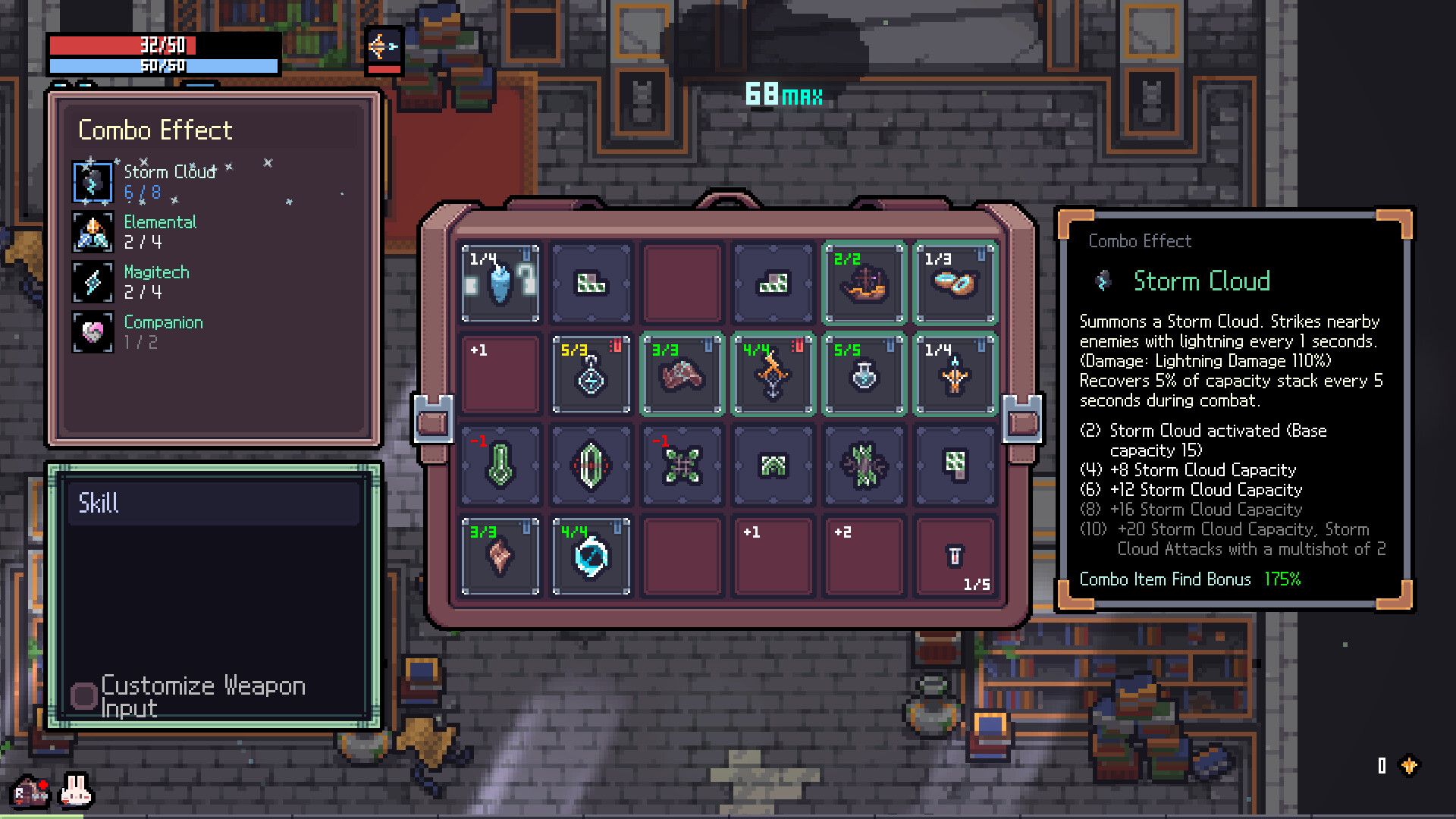
| Can you rebind everything?Both devices have their own remapping screens, and there is a Controls page in the settings (referenced as '设置 - 控制页面' by a Chinese feature request). TEAM HORAY's own notes show the machinery: 1.0.26 'More quick cast keys can now be added in the Options - Gamepad menu' and 'Fixed a bug where stick tilt could be assigned as a control key in the key settings'; 1.0.24 'Added an option to change the Preset Settings key in the Options menu'; 0.12.3 'Fixed a bug where the "start" button was included among the remappable keys when remapping gamepad inputs on Steam Deck'. The gaps are real and documented in the issue rows above: Preview Level and Root's Retreat have no gamepad binding at all, preset is welded to D-pad right, and DualSense triggers resist binding. There is also a per-weapon 'Customize Weapon Input' button inside the Skill panel, visible in TEAM HORAY's store screenshot 3.ConfirmedOfficial 1Official 2Official 3Official 4 | Yes, with gaps | Yes, with gaps — separate Options - Gamepad menu |
| Steam Deck and Steam Machine controller statusValve's compatibility report for appid 2436940 returns category 3 (Verified) with all four tests passed: 'Default controller configuration is fully functional', 'Controller glyphs match Deck device', 'Interface text is legible', 'Default configuration is performant'. Steam Machine is also Verified (default controller config functional, glyphs match, performant); SteamOS generally sits one tier lower at category 2 with only game startup verified. IMPORTANT LABELLING NOTE: this is Valve's testing, published on the Steam store page — it is platform-official, not a TEAM HORAY statement, so it does not belong in any 'the developer says' block. TEAM HORAY have shipped Deck-specific work of their own: larger fonts on by default, smooth fonts by default, a Deck remapping fix in 0.12.3, and in 1.0.30 'Improved an issue where the game would close in certain situations when playing on Steam Deck.'ConfirmedOfficial 1Official 2Official 3Official 4 | — | Deck Verified — default controller configuration fully functional |
Not documented
- DashNOT SOURCED. Dash is central to the game (dash attacks, Dash Count, Overheat stacks) and TEAM HORAY reference it constantly in patch notes — 1.0.30 'Fixed an issue where Dash did not work while using a gamepad if the auto-aim target overlapped with your character' proves the gamepad has a dash button — but no source I could reach names the default key or button on either device. Left null deliberately. Do not guess Space or Shift.UnverifiedOfficial
- Second consumable slot (below the potion slot)NOT SOURCED. Store screenshot 4 shows a second slot directly under the R potion slot, holding a different item, with its own key cap. At full 1920x1080 resolution the cap renders as a white up-arrow glyph plus a second, partially occluded dark character — I could not read it reliably and will not guess. Left null.UnverifiedOfficial
- Rotate a Tablet on a gamepadNOT SOURCED. The action must exist — the game is Steam Deck Verified with 'Default controller configuration is fully functional', and Tablet rotation is unavoidable in normal play — but no TEAM HORAY note, no store screenshot, no wikiwiki.jp page and no Steam thread I could find names the button. Left null rather than assumed. Verifying it needs one screenshot of the Tablet placement panel taken with a gamepad active, where the Rotate row swaps its mouse glyph for a controller glyph.UnverifiedOfficial
| Problem | Where it stands |
|---|---|
| 21:9 ultrawide clips the Woodlands mission-select windowReported 14 Aug 2026: 'When you interact with the bounty board you get to pick between 6 different objectives, the window doesn't fit in a 21:9 (3440x1440) resolution, causing the bottom two options to be unreadable. It forces you to either rely on a party member to tell you what it is, or to switch your resolution to a 16:9 one (e.g. 2560x1440) temporarily.' Distinct from the ultrawide reroll-hover bug TEAM HORAY fixed in 1.0.21 and the preset-button resolution bug fixed in 1.0.27; no note covers this one. | Still reportedOne report onlyCommunity |
| Aiming Grimoires on a gamepad — does it work, and what is the limitYes, you can cast and aim Grimoires on a pad, and TEAM HORAY have actively improved it: 1.0.26 'Improved usability when casting magic with a gamepad', 'A gamepad skill UI is now displayed on screen', 'More quick cast keys can now be added in the Options - Gamepad menu', 'The RT key has been changed to the default key for Quick Cast 1.' The limitation is targeting feedback, and two players describe the same thing from opposite directions. Requesting one (19 Aug 2026, DualSense): 'there doesn't seem to be any crosshair when aiming spells from the Grimoires. This can lead to missing spells like "Rain of Arrows" or some of the weapons' upgrades that require you to choose an area to attack. Could we get a crosshair, similar to when using mouse and keyboard?' Wanting to hide it (14 Aug 2026): 'When using a controller there is a small half-transparent crosshair showing up in front of the character ... It's not the same crosshair that is shown when you use a mouse. It's a smaller and less noticable crosshair.' So: ground-target spells are harder to place on a pad, and there is no option to resize, replace or hide the marker. | Still reportedConfirmedCommunity 1Community 2Official 3 |
| Analog stick aiming auto-attacks when aimed upward'I automatically attack when aiming up and in no other direction. It's very strange.' One report, no replies, no matching patch note through 1.0.30. Included at low confidence because it is the kind of thing that makes a reader think their pad is broken; flag it as a single unconfirmed report, not as a known issue. | Still reportedOne report onlyCommunity |
| Back paddles (L4/L5/R4/R5) cannot be used for quick-castDirect consequence of Steam Input being off by default. Request from 14 Aug 2026: 'currently for controller it works well but there isnt a way to assign quickcast to anything than the default controller button. would be nice to have the opition to assign L4, L5, R4, R5 ... I want to quick cast while still being able to use the right stick. feels bad when i cant use the extra 4 button that i have.' The workaround another player gives for controller customisation generally is to go through Steam: 'You can also just click the game in your library and then the little controller icon on the top right. You can check for Community controller layouts or bind everything however you want directly in Steam' — which only takes effect once Steam Input is switched on for the game. | Still reportedConfirmedCommunity 1Community 2 |
| Binding Attack to a trigger fires twice per pullTEAM HORAY fixed one half of this in 0.11.0 (25 Mar 2026): 'Fixed an issue where assigning Special Attack to triggers via gamepad caused multiple inputs.' The other half was reported later, on 8 Jul 2026: 'When remapping controls for a controller, setting Attack to one of the triggers causes each pull of the trigger to execute two attacks. Presumably, pressing and releasing the trigger is being seen as 2 inputs, or a held input that's longer than it takes for the auto-combo to take effect.' No patch note names the plain Attack case. This matters because binding Attack to a trigger is exactly what accessibility-motivated players try first. | Still reportedConfirmedOfficial 1Community 2 |
| Cannot swap potions on a gamepadReported 14 Aug 2026 on 1.0.28-era build: 'Potion swapping will not work on Gamepad, even after resetting keybinds. I can swap potions with keyboard, but not with the Gamepad. It might be a multiplayer issue, as I have not experienced this outside of another's game. Picking up a third potion allowed me to swap, but once I was back down to two, I could not swap.' No reply, no matching patch note through 1.0.30. | Still reportedOne report onlyCommunity |
| Controller does not work on macOS at allThe one place TEAM HORAY's fix does not work. In the 'Controller doesn't work on Mac' thread (opened 11 Aug 2026, still active 17 Aug 2026) five separate Mac users report Xbox, 8BitDo, GameSir and even Valve's own Steam Controller failing: 'Tried enabling and disabling Steam Input. Left stick works but none of the buttons does anything.' (Robotonic). 'Steam controller itself also doesn't work.' (yngwi). One user notes rebinding is also unavailable: 'it won't let my rebind controller inputs for a fix' (gEO). A separate thread reports controllers breaking on Mac specifically after the 1.0.22 update. No TEAM HORAY reply and no patch note through 1.0.30 addresses it. | Still reportedConfirmedCommunity 1Community 2 |
| F and RB do nothing at the dungeon entrance — looks like an input bug, is not oneWorth a paragraph on the page because the symptom reads exactly like broken controls and sends people to rebind keys. From 1.0.25 onward a cluster of players could not enter the dungeon: 'Neither "F" nor "RB" work on the dungeon alone. Everywhere else it works as intended and i can change my loadout and enter the traininggrounds for example.' Confirmed by at least six other players including on fresh save files and with both input devices ('keyboard or controller same, other interaction normal, can enter room'). Reinstalling did not help and cost one player his save. The closest official fix is 1.0.26's 'Fixed an issue where, if Steam was not recognized properly, there was a low chance of being unable to enter the next stage' — plausibly the same root cause, but TEAM HORAY did not say so, so do not claim it as the fix. The pinned FAQ's multiplayer section describes the same underlying failure mode (the game not reaching the Steam client at launch) and its remedy: close Steam fully, delete any steam.cfg in the Steam folder, let the client update, relaunch. | Still reportedConfirmedCommunity 1Official 2Official 3 |
| Gamepad button sticks after casting a spell while holding a face buttonTwo players in April 2025 describe the same failure and a working fix: 'if you have a spellbook, buttons can get stuck if you're holding a button when pulling the trigger to cast a spell. Tap the corresponding button again to unstick the button. It's been reported a few times but no response yet' — confirmed by a second poster, 'its definitely a bug in the game. Me and Cliche have reported it a few times now.' No patch note through 1.0.30 matches. Symptom in the wild: dash appearing to stick on, or the character locking into a run. NOTE FOR THE WRITER: a later reply in that same thread repeats the same advice but cites sephiriawiki.online — a known-bad source. Cite the two 2025 posters, not that reply, and do not link that wiki. | Still reportedConfirmedCommunity |
| Grimoire fires together with the normal attack on an Xbox padFiled 13 Aug 2026 against version 1.0.26 using TEAM HORAY's own bug-report template. An Xbox pad user with a Grimoire on LB+A finds it casting on every normal attack: the trigger point varies by weapon (dagger on the normal attack, crossbow on the mine after a dash, other weapons on the first normal attack), keyboard and mouse behave correctly, and the LB cast motion never plays — which is what makes the reporter conclude it is a 1.0.26 regression rather than a hardware fault. No reply and no matching note in 1.0.27 through 1.0.30. | Still reportedOne report onlyCommunity |
| L2 / R2 cannot be bound on a DualSenseA player with nerve damage in his right hand could not rebind primary attack to L2 on a PS5 pad: 'when I try to rebind the primary attack as L2, the game refuses to comply.' Two workarounds were offered in-thread, both community: force it through Steam Input by finding the button primary attack currently uses and mapping that button to L2; or 'plug a another controller (not a dual sense) or use a software (as ds4windows) then you can map it. After that, you can use your initial controller (or close the software) and then L2 and R2 will work in game!' TEAM HORAY shipped a partial fix in 1.0.26 — 'Fixed an issue where the button icon disappeared when assigning a trigger button while changing key bindings with a DualSense controller' — which addresses the missing glyph, not necessarily the refusal to bind. Reported before that patch, so its current state is unconfirmed. | Still reportedConfirmedCommunity 1Official 2 |
| Left-click attack dies permanently after inviting a friend with Steam Shift+TabPosted 3 Aug 2026 in Bug Reports: 'Whenever I host a game and invite a friend by using the Steam Shift+Tab menu, my character's left click attack gets permanently disabled until I restart the game. It doesn't happen if I Alt+Tab out and invite them from the main Steam window. I am using Windows 10.' No replies, no matching patch note. Adjacent and possibly related: 1.0.26 fixed 'an issue where magic casting mode was not canceled while the Steam overlay was open' — the same overlay, a different stuck state — but TEAM HORAY did not claim the left-click case. Workaround from the report itself: invite from the desktop Steam window instead of the overlay. | Still reportedOne report onlyCommunity 1Official 2 |
| Mouse cursor flashing and clicks not registeringOne report, in Korean, in the Bug Reports forum, posted 10 Dec 2025 under the title '게임 실행 후 마우스가 안 되는 버그' (mouse bug after launching the game): '게임을 실행하면 마우스 커서가 매우 빠르게 깜빡이면서 우클릭 좌클릭이 모두 원하는 대로 안 되는 오류가 있습니다. 11월 28일 업데이트 이후로 생긴 버그입니다.' — when the game launches the mouse cursor blinks very rapidly and neither right-click nor left-click work as intended, starting after the 28 November update. Zero replies, no TEAM HORAY response, and no patch note from 0.10.4 through 1.0.30 matches it. Status: open and unacknowledged. The only official guidance that applies is the pinned FAQ's general remedies — update the graphics driver, verify game files, flip the Steam Input setting. | Still reportedOne report onlyCommunity 1Official 2 |
| Root's Retreat / Preview Level +- has no gamepad binding and cannot be assigned oneTwo independent reports on 13 Aug 2026, both on 1.0.26. kujabuja (Steam Deck): 'Preview Level is currently not a bindable option for controller ... On keyboard this is curently set to q and e - but theres no controller option to bind a key at all for it // nothing works without going to keyboard mode.' Thoxic: 'The actions for increasing and decreasing root retreat seem completely unassigned for controller (but do work when switching to keyboard). There is also no option to reassign these buttons for controller (while that does exist for keyboard)' — and adds that they used to work, 'using R1 and L1 iirc'. TEAM HORAY's 1.0.28 note covers the Hard Mode difficulty case explicitly but does not mention Root's Retreat or Preview Level, so treat this as unconfirmed-fixed rather than fixed. | Still reportedConfirmedCommunity 1Community 2Official 3 |
| Scroll bars do not scroll with a controllerReported 31 Jul 2026 and confirmed by a second player on 5 Aug 2026. Original: 'Upon starting the game fresh, trying to use the controller to select a language does not scroll the list. Instead, the cursor simply appears below the window for the options.' The reporter then widened it: 'Updating this to scroll bars in general. The scroll bar in the training grounds for weapons testing doesn't work with a controller either.' Second player: 'Tried scrolling the "Lore - Tutorial" section of the pause menu and it wouldnt scroll but would still show what was being selected further down.' No patch note through 1.0.30 addresses it. Practical consequence: a controller-only first launch can leave you unable to reach languages further down the list. | Still reportedConfirmedCommunity |
| Controller not detected / only the left stick worksTEAM HORAY's own pinned Technical Support FAQ has a section headed 'When Controller Doesn't Work'. Its instruction is NOT 'turn Steam Input on' — it is to flip the setting to whatever it currently is not: 'Please try changing the Steam Input setting to the opposite (Use or Don't Use) and try the game again. (Steam -> Settings -> Controller -> Enable/Disable Steam Input for Controller) Sephiria does not use Steam Input by default.' The post is by MegurinE, carries Steam's [developer] badge, is pinned in both the General Discussions and Bug Reports forums, and was last edited by MegurinE on 10 August 2026 — so this is current 1.0.x guidance, not stale Early Access text. | Current behaviourConfirmedOfficial 1Official 2 |
| Zoom out / scale the UI down at high resolutionsThere is no zoom-out, camera-distance or UI-scale-down option, and TEAM HORAY have not announced one. Every scaling control in the game goes the other way: the 1.0 Update added 'An option to increase font size ... (Enabled by default on Steam Deck)', and 0.12.3 added selectable smooth fonts plus 'Improved UI readability at HD (1280x720) resolution'. The complaint this keyword cluster actually maps to is a 3 Aug 2026 thread from a 4K player: 'the text is WAY too big ingame, with no way to scale it down. Resolution doesn't even matter. 4k in this game looks like it's just 480P but enlarged. I've looked through the menu and you can only make the text EVEN BIGGER.' He refunded; no developer replied. A related request for a resizable crosshair ('is there gonna be an option to resize crosshair anytime soon?') also went unanswered. I scanned 470 topic titles and previews across both the General Discussions and Bug Reports forums and found no thread mentioning zoom, camera distance or FOV at all — so the honest answer on the page is that the option does not exist and nobody has been told it is coming. | Not in the gameConfirmedOfficial 1Official 2Community 3Community 4 |
| Blinking selection indicator on controllerIncluded so the page does not conflate two different blinking things. 0.12.3 (1 Jul 2026) made blinking a deliberate feature — 'When using a controller, the border of the currently selected UI element now blinks' — and in the same patch removed a genuine bug, 'Fixed a bug where a blinking indicator remained in the center of the screen after closing the multiplayer UI while using a controller.' Neither is the same thing as the unresolved Korean cursor-flashing report from Dec 2025. | Fixed in 0.12.3ConfirmedOfficial |
| Cannot click to attack when the cursor sits over the HUDFIXED in 0.10.13, 30 Jan 2026. TEAM HORAY: 'Keyboard and Mouse: Fixed an issue where you could not attack by clicking if the mouse was over the HUD buff UI space.' This is the specific, real 'my clicks do nothing' bug with a known cause and a known fix — worth separating from the still-open cursor-flashing report above, which has a different symptom (the cursor itself flickers) and no fix. | Fixed in 0.10.13ConfirmedOfficial |
| Cannot close the photosensitivity warning on the title screenFIXED in 1.0.23, 4 Aug 2026, three days after launch. TEAM HORAY's wording: 'Fixed an issue where the "Photosensitivity Warning" UI could not be clicked on the title screen during the first (or second) launch of the game.' The warning itself was added in the 1.0 Update ('A photosensitive seizure warning is now shown when the game starts'), which is why it only ever bit launch-week players. The community thread that reported it (1 Aug 2026) also records the workarounds people used before the patch: 'I managed to use a controller to skip the msg and after it allowed me to use my mouse to get through it', and 'I can't click anything on mine, controller does nothing too'. If a reader is on 1.0.23 or later this cannot happen to them. | Fixed in 1.0.23ConfirmedOfficial 1Community 2Official 3 |
| Dash did not work on a gamepad when the auto-aim target overlapped the characterFIXED in 1.0.30, 20 Aug 2026 — the current version: 'Fixed an issue where Dash did not work while using a gamepad if the auto-aim target overlapped with your character.' Already in the repo's patches.json. A likely-related older complaint is still worth flagging next to it: 'using an Xbox controller ... sometimes when i dash, I stay in place and other times i dash, i automatically go into speed mode and can't slow down' — that thread's cause was diagnosed by other players as the spellbook input-state bug (separate row), not the auto-aim overlap. | Fixed in 1.0.30ConfirmedOfficial 1Community 2 |
| Hard Mode difficulty could not be changed on a gamepadFIXED in 1.0.28, 14 Aug 2026: 'Fixed a bug where the Hard Mode difficulty level could not be changed properly using a gamepad.' Already in the repo's patches.json. The community reports from the day before show how bad it was: a Steam Deck player found 'I can no longer adjust difficulty on hard mode tablet' and had to hold the Steam button to force trackpad mouse mode to change it — 'Works but not ideal.' The same underlying binding gap hit Root's Retreat (next row). | Fixed in 1.0.28ConfirmedOfficial 1Community 2 |
| Mouse cursor locked inside the game window in windowed and borderless modesFIXED in 1.0.24, 7 Aug 2026: 'The mouse cursor can now be moved outside the game window while navigating the UI.' The paper trail on this one is unusually clean. A player asked in April 2025; MegurinE [developer] replied 'We'll discuss with the team the idea of allowing the mouse to move outside the game screen while the game is paused, similar to how it's handled in Hades.' The thread was necroed on 17 Aug 2026 by someone still angry about it, and another player corrected him on the spot: 'Bro. This is already in the game. You necroed a post from Early Access in 2025.' A separate Chinese request (15 Jul 2026) documents the residual case that 1.0.24 does NOT cover: in windowed mode the window spawns in the top-left corner and, once loading finishes, the cursor is trapped, so you cannot drag the title bar to reposition the window. | Fixed in 1.0.24ConfirmedOfficial 1Official reply 2Community 3 |
| Preset buttons could not be selected at certain resolutionsFIXED in 1.0.27, 13 Aug 2026: 'Fixed a bug where preset buttons could not be selected at certain resolutions.' Already recorded in the repo's patches.json. Related ultrawide problems: 1.0.21 fixed 'a bug in ultrawide resolutions where hovering over the "Reroll" button would instead select the Auxiliary Bag icon', and a 21:9 mission-select clipping bug is still open (separate row). | Fixed in 1.0.27ConfirmedOfficial 1Official 2 |
The thing to try first
If the controller is detected but only movement works, toggle Steam Input to the opposite of whatever it is set to now — Properties → Controller → Steam Input, then restart the game. The direction that fixes it varies by pad, which is why the instruction is “toggle”, not “turn on”.
On Windows this is the most reported input problem in the game, it is a configuration mismatch rather than a bug, and it is the one thing worth trying before reading anything else.
On macOS the same symptom is a different problem and this fix does not work. Five Mac users — across Xbox, 8BitDo, GameSir and Valve’s own Steam Controller — report the left stick working and nothing else, with Steam Input toggled both ways. That thread was still open in August 2026. It is the row Controller does not work on macOS at all in the table above; nothing on this page fixes it yet.
Rotating a Tablet: more than one answer
The 1.0 notes say “you can now rotate Tablets with a middle mouse click” — and the word doing the work is now. A rotation key already existed before that: a patch note from April 2025 fixes “an issue where pressing the tablet rotation key in the shop would sell items.”
The in-game prompt on the placement panel shows the right mouse button. So there are at least two inputs that rotate, the announcement documents one of them, and the prompt advertises another. If a guide tells you there is exactly one way to rotate a Tablet, it has picked one and dropped the rest.
Two problems that were bugs, and are fixed
Both of these generate steady search traffic, and both have the same answer — it was broken, and then it was not:
- The photosensitivity warning could not be closed. It was added at 1.0 and, on the first or second launch, its UI could not be clicked on the title screen. TEAM HORAY fixed that on 4 August 2026.
- Clicking sometimes did not attack. If the cursor sat over the HUD’s buff area, the click was swallowed. Fixed in January 2026.
If you are reading a thread about either, check its date.
What is not documented
Three actions exist and nobody has written down how they are bound: Dash, the second consumable slot below the potion slot, and rotating a Tablet on a gamepad.
That is not an omission on this page — it is the finding. TEAM HORAY’s own 1.0.30 notes prove a gamepad dash button exists, by fixing it: “Dash did not work while using a gamepad if the auto-aim target overlapped with your character.” The action is real. The binding is simply not published anywhere reachable, and the store screenshots that show the other key caps do not show these legibly.
A page that filled those three rows with Space, Shift and a shoulder button would look more complete and be worth less. Each of them says instead what would settle it.
Related
- Sephiria Platforms — Steam Deck Verified, and what that rating covers
- Sephiria Tablets Database — the shapes you are rotating
- Sephiria Patch Notes — where every fix date above comes from
- How Sephiria Co-op Works — the multiplayer input issues sit there
Sources
- OfficialTEAM HORAY's Steam announcement archive — all 106 posts, the source of every quote and every fix date on this page
- OfficialFuture Updates Preview — "the current controller support is not satisfactory, we plan to provide additional support in the future" (12 May 2025)
- Official0.7.43 Update — the secondary key binding feature (1 Jul 2025)
- Official1.0 Update — middle-click Tablet rotation, and the photosensitivity warning (31 Jul 2026)
- OfficialSephiria on Steam — store screenshots, used to read key caps off the in-game HUD